Online localization platform

If you’re working on a localization project and would like to have the translation work done online, Pootle is currently the best option I found. Having an online translation platform is a great option for collaborative work since your team of translators can work from different parts of the world simultaneously.

Pootle has a nice user rights management feature allowing you to set the responsibilities of each team member in your project:
Create and manage your online surveys

In the past, to run online surveys I used GoogleDocs and SurveyMonkey. One was a paid service and the other too minimalistic. LimeSurvey though is a very nice open source platform to run complex online surveys however you choose.

The list of features is quite incredible, the best ones I found were the export / import format options (including SPSS, CSV, PDF, and .xls); large possibly of question types; integration of pictures and movies in a survey; and plenty of graphics options for you to analyze results inside the platform.

Recover lost Windows passwords

Forgot your Windows login password? You can recover it easily with Ophcrack.

You can run Ophcrack through a live CD and have your passwords in no time. Or download the software to run on different platforms, even running in Windows itself if you have access to another user’s account.

Once downloaded, the software is incredibly easy to use and will recover the passwords of all users in your Windows installation, Windows XP or Vista.

Identi.ca with new features!

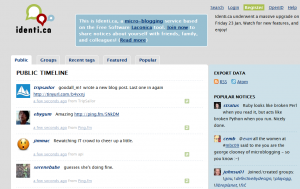
The open source based microblogging platform identi.ca has recently added some cool new features:

  • hip new design giving the platform a fresher look;
  • cloud tags for individual micro-bloggers;
  • and the best of all, groups! You can create groups, join existing ones and write posts inside groups writing “!” in front of the group name.
identica

Adding groups functionality is a nice feature, inspired (maybe?) in FriendFeed’s rooms. People with similar interests can discuss topics together and you’ll always receive posts of the groups you’re connected to.

Creating diagrams [Windows/Linux]

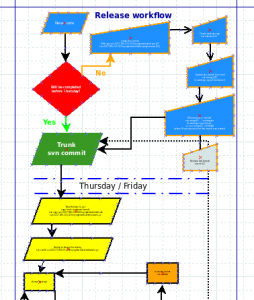
Don’t think Visio is the only application out there to create diagrams and workflows, Dia is an excellent alternative!

dia screenshot

With Dia you can easily create relationship diagrams and with the several object styles it has, you’re able to do some more technical work such as UML diagrams, flowcharts, and chronograms. Although the default format you can save your files will be .dia, there is an excellent export tool for several formarts including svg, png, eps, jpg, and bmp.

Using rsync with no command like [linux]

For those (like me) who are interested on using rsync but are command line inexperienced, finding a GUI is a lifesaver.

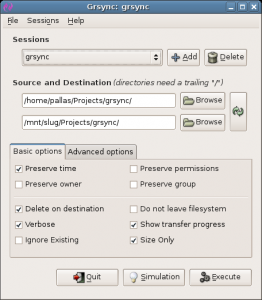
grsyncGrsync can make sure you use rsync without the terminal. The developers list several features such as:

  • you can easily run the most common rsync tasks, more complex tasks can still be done but with command line tweaking;
  • Saves multiple settings with customized names;
  • performs simulations or normal executions;
  • print rsync output to a log or a separate file;
  • operation pause.

For those who have no clue about what is rsync, it is a tool used very often for backups and incremental file transfers. In other words, if you’re doing a backup with rsync, you will not have to copy every single file over and over again in different backups, only the files that have changed.

Ten open source projects I learned to love in 2008

As the last post of the year I wanted to sum up a short list of the best open source projects I met in 2008. Several from the list were created way before, but only got used by yours truly this year.

Without further delay:

  • Identi.ca which I’m now using way more often than Twitter;
  • Gwibber is pretty much the only way I’m using Twitter nowadays since I ditched Twihrl. This is a great project and best of all, I know it is under heavy development so more features should be added to it soon.
  • GnomeDo is installed in every Linux computer I get my hands on, makes working on a computer so much easier and faster.
  • Funambol is incredibly fascinating with their push-PIM technology, syncing Google Contacts really saved my week!
  • Ubiquity is my GnomeDo for Firefox, now indispensible for me. If I want anything translated, placed on a map, searched, … Ubiquity comes to the rescue.
  • Evolution actually suprised me quite a bit at how easy it was to use and at the same time incredibly resourceful for my emails, calendar, and contacts management.
  • Bugzilla, once I learned my way through it I can’t imagine working with a development team without it.
  • Gears has nicely bridged the online world with the offline world, with extreme simplicity for the end user.
  • VirtualBox made my life easier to test different Linux distros I wanted throughout the year and nicely allowed me to use Windows without having restart my computer.
  • Miro is what I use to watch several vidcasts, there is a plethora of channels subscribe to and the list is growing quite well.

With open source projects, you never know if there will be future releases but all of these projects seem to be quite healthy for now and hopefully next year will continue quite strong. Can’t wait to see what the open source world will bring in 2009!

Last.fm on Symbian phones

I’m a big Last.fm enthusiast (although it isn’t open source) so I try to install a scrobbler on every single media player I use. It took a bit of time for me to find a Symbian Last.fm client and mobbler it was.

mobblerMobbler works like a charm! It recognizes and scrobbles songs being played by the phone’s native media player, plus I get all of the cool Last.fm features such as:

Converting .mp4 to .ogv format

Over these past 2 days I recorded some videos on my Symbian cell phone that I wanted to share with my family back home. Problem is that the videos are saved in .mp4 format, which gave me some problems when trying to edit them (video editors I tried to use didn’t support mp4).

So, as we speak I’m converting these files to .ogv with ffmpeg. Linux command line work is involved but just writing one very simple line:

Listen to ogg on your Symbian device

As an open source fan, I make my audio CDs portable in .ogg (.oga) format. Problem is that unfortunately .ogg isn’t as popular as it should be right now so sometimes it can be difficult to find a decent player, which is exactly what happened with my new Symbian cell phone.

Symbian OggPlay to the rescue, I was able to solve the issue. OggPlay can play.ogg, .oga, .flac (haven’t tested it myself yet), and .mp3. It also recognizes the default audio formats you have on your mobile so you can still play .wma (for example) with the same program.