Posts for: #Office

Ebook reader and manager

For those who like ebooks, Calibre is a great program that was created to manage pretty much any aspect of your reading files.
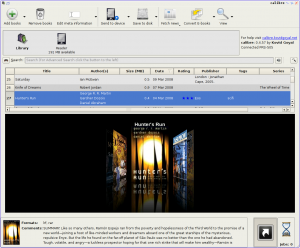
calibre

The list of features is pretty extensive:

  • convert files from and to epub, mobi, LRF and supports input of several other formats including PDF, html, odt, rtf amongst others;
  • syncs to mobile reader devices (seems to work well with the iPhone/Stanza and the Kindle);
  • convert a news feed to an ebook;
  • scans your computer to check for all supported ebook formats so you can keep them organized, download cover art and meta data;
  • runs on Windows, Linux and MacOS X.

At the present moment the app is on version 0.5.3 and seems to be under heavy development. For me, file conversion from PDF to epub format went without any hitches and I was finally able to organize my ebook library under one program.

[Read more]

Import and edit PDF files in OpenOffice

For quite a while now OpenOffice has been promising the ability to import and edit PDF files. Although not released with the program itself, you can grab the Sun PDF Import extension to do just that.

This extension is in beta and is available multi-platform for Windows, Linux and MacOS X systems.

Tests that I ran were pretty good. The text in the PDF file is imported well and in a way I could edit the text, font settings and images. There was a small problem in that the document that was shown to me had colors inverted (black background with white font). But, don’t ask me why, the imported file actually contained 2 layers. Deleting the one on top will show you the layer with correct colors and fully editable.

[Read more]

Abiword – multi platform word processor

After a recent exchange of ideas about Abiword on identi.ca, I decided to take a closer look at it again. Although OpenOffice is currently my office suite of choice, it is a bit bloated and slow. So, what does Abiword have to offer?

abiword1

  • It is blazing fast;
  • works in Windows and Linux;
  • has all the main text editing and formatting functions one needs;
  • saves and imports documents in multiple formats (Abiword’s own formats, .doc, .odf, .html, .rtf, .pdf, .docx, LaTeX, Kword and xml);
  • has revision control;
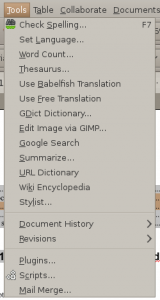
  • has spell checker and thesaurus built-in;
  • and, has a plug-in architecture to improve its list of features even more!

abiword-tools

[Read more]

Open source at work

Migrating from a proprietary licensed mindset into open source can be perceived as a pretty challenging task. It is incredibly common for me to see that branding power often blinds people in a way that the functionalities of a software are disregarded in favor of the comforting sound of a brand name.

What does all that marketing blah blah means?

At my work, all new computers have open source software on it. The email client, office suite, browser, image editor, project management software and programming tools are all installed in the new employee’s computer from his/her day one.

[Read more]

Project Management

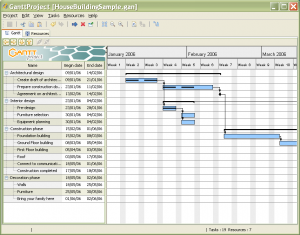
GanttProject is currently what I’m using for my project management duties. Why?

  • it is multi-platform (works on Windows, Linux, and MacOS X);
  • simple to use;
  • open source;
  • allows me to manage well dependencies, resources and milestones.
ganttproject-house-building-sample

The main drawback is that it is Java based so a bit slower to run than other native programs.

[Read more]

eBook open standards

If you like to support open standards format, here is a (at least for me) new discovery:  .epub.

If you like open standards and ebooks, support the spreading of .epub. This file extension is a mixture of three open standards OPS ( Open Publication Structure ), OPF ( Open Packaging Format ) and OCF (Open Container Format ), produced by the IDPF.

From what I know Kindle – the hot ebook reader of the moment – does not support .epub format However, you can find some .epub ebooks in various websites, including Project Gutenberg. Viewing these files will be no problem with a software like FBReader.

[Read more]

Creating diagrams [Windows/Linux]

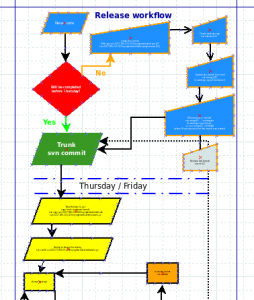
Don’t think Visio is the only application out there to create diagrams and workflows, Dia is an excellent alternative!

dia screenshot

With Dia you can easily create relationship diagrams and with the several object styles it has, you’re able to do some more technical work such as UML diagrams, flowcharts, and chronograms. Although the default format you can save your files will be .dia, there is an excellent export tool for several formarts including svg, png, eps, jpg, and bmp.

[Read more]

Open source push emails and contacts sync

I got a new phone and was terrified about the manual work that would be needed to sync all of my contact details. But then I thought, we’re in 2008 so there must be an open source way of doing this!!

Funambol MobileWe did the trick perfectly! Funambol allows syncing over the air emails, contacts, calendar, tasks and notes with mobile devices. The site reports syncing capabilities with 1.5 billion mobile devices and thousands of online services. You can sync your information from GMail, Yahoo!, Hotmail, Thunderbird, AOL, MS Outlook (if you’re still using it), and emails from POP and IMAP access.

[Read more]

Organizing Tasks in Linux

While trying to make my productivity life easier on my machine, I started searching for a program that would allow me to have a 2-way sync between my desktop and RememberTheMilk. As I’ve mentioned before, Evolution does only 1-way sync to my favorite task management web application.

So, searching away in the vast world of the internet I found Tasque. Built for Novell’s Hackweek v2, Tasque plays nicely with Gnome and RememberTheMilk to display tasks.

[Read more]

Why I’ve switched from Thunderbird to Evolution

On my computer (unfortunately) I’ve always had a dual boot setup. For my email, calendar, and contact management Thunderbird was my favorite pick. Was until I had a closer look at Evolution.

Why have I now switched?

1) Thunderbird is email and contacts only, so there is the need to install Lightning or Sunbird to get calendar and tasks functionality. With Evolution, everything is already packaged, more convenient for me.

[Read more]