Screencasting on Linux – recordMyDesktop
Doing a basic screencast in Linux is pretty easy. The package recordMyDesktop can be found easily on the repository of many Linux distros (including Ubuntu 9.04 that I use).
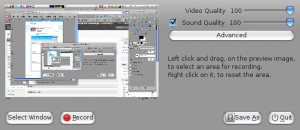
With this package you’re actually getting the backend recordMyDesktop which is written in C and the frontend developed in Python (gtk-recordMyDesktop or qt-recordMyDesktop).
The feature list is simple but that is all I needed for a quick screencast demo I had to prepare this afternoon:
- record the entire screen or just a specific window;
- record audio (with channel and frequency settings);
- adjust fps;
- include mouse pointer, “follow the mouse” recording, include window decoration (or not), and tooltips.
The closing added bonus, it records directly in theora / vorbis!
Recording is done with a simple click on the “record” button and than on the panel you’ll see an icon where you can quickly pause, resume and stop the recording. Easy and simple.
Read other posts